

Desktop automation - distribute software, automate processes, reduce IT workload
- Unlimited possibilities for automation
- Simple, intuitive creation of client jobs/commands via drag & drop
- Standardize complicated configuration processes
The Desktop Automation is the heart of the acmp Suite and forms the technological basis for efficient, scalable and secure IT management. Without any programming knowledge, administrators can use the powerful Client Commands to create automated routines for servers and clients - from software distribution and patch processes to complex desktop deployment scenarios.
More than 170 ready-to-use commands enable flexible, reliable automation that makes everyday work noticeably easier and reduces sources of error.
The most important features at a glance

Dynamic grouping function through the acmp container

Comprehensive Unix script distribution with test & release processes

Software packaging with release process

Create and distribute client commands via drag-and-drop
Intuitive automation for any environment
acmp Desktop Automation makes it possible to fully automate recurring tasks. It is so easy to use that even less experienced IT staff can quickly become productive.
Commands can be applied directly to individual clients or entire client groups via drag-and-drop - acmp always ensures correct and secure execution.
Extended inventory - flexible, complete, individual
In addition to the automated hardware and software inventory, any additional information can be recorded - for example:
- Inventory numbers
- Room designations
- Departments
- Telephone numbers
- Site-specific data
These values can be filled automatically, queried via a user form or set manually.
Devices outside the network can also be mapped cleanly: Manual Clients ensure that no system is overlooked in planning, evaluations or compliance processes.
Dynamic containers - intelligence that does the work for you
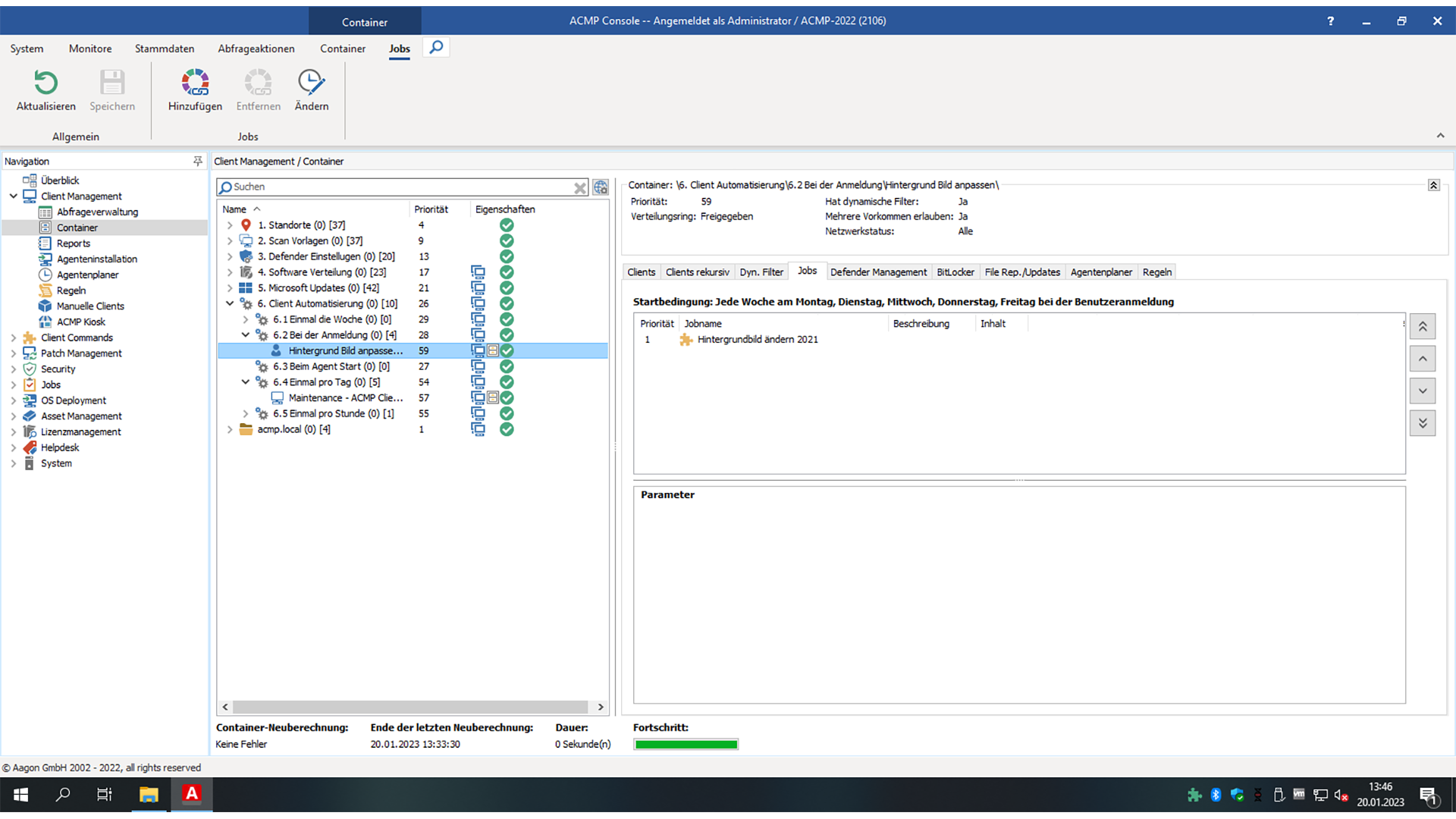
The container concept forms the foundation for automated administration processes. Systems are automatically sorted into suitable groups - depending on freely definable properties.
Example:
If a client reaches a certain memory limit, acmp automatically moves it to a suitable container and starts the defined optimization jobs, such as cleaning up temporary files.
In this way, many unpopular routine tasks take care of themselves - reliably, traceably and in the background.
Maintenance window - maximum control over execution times
To manage complex IT environments securely and predictably, maintenance windows can be stored directly on containers.
This keeps critical systems stable and administration processes fully controllable:
- No unplanned interventions: Jobs outside a maintenance period are automatically suppressed.
- Scheduled execution: With the condition "Execute in next maintenance window" , jobs can be moved precisely to approved time periods.
- Exceptions can be controlled: Authorized persons can deliberately override maintenance windows - clearly documented, with unambiguous responsibilities.
The calendar-based view enables quick planning of recurring periods as well as the creation of one-off special maintenance tasks.
More predictability. Less risk. Maximum stability.
Integrated report engine - evaluate everything, track everything
All automation data can be evaluated flexibly and freely parameterized via the integrated report engine - ideal for:
- internal documentation
- Management reports
- Compliance requirements
- Audits and evidence
Transparency and traceability are guaranteed at all times.
Managing Unix scripts - heterogeneous environments under control
acmp allows the direct distribution and execution of shell scripts (bash & zsh) via the agent. Perfect for:
- Automated software installations
- Configuration changes
- System-related administration processes
Includes:
- Test & release processes
- Operating system filter for precise assignment
- integrated versioning
This means that even heterogeneous environments can be managed uniformly and consistently.
Drag-and-drop for maximum efficiency
Whether you drag client commands onto clients or clients onto commands - acmp automatically interprets the action correctly and implements all jobs correctly.
This not only makes working intuitive, but also particularly fast, secure and convenient.
Product insight
References
What our customers say



acmp Editions
Our product portfolio provides a structured overview of our versatile UEM solution acmp, consisting of different editions and supplementary add-ons. This allows us to flexibly cover your individual requirements and provide scalable solutions for various application scenarios.
Starter
Die Starter Edition bildet den idealen Einstieg in das Unified Endpoint Management.
Beinhaltet folgende Funktionen:
- Inventarisierung und Reporting
- Konnektivität und Sicherheit nativ integriert
- Betriebskontinuität – durch steuerbare Systemverfügbarkeit
- Granulare Test- & Freigabeprozesse
- Zentrales Microsoft & Windows Update Management
- Drittanbieter Kataloge für Treiber
Advanced
Die Advanced Edition richtet sich an Unternehmen, die ihr Unified Endpoint Management über die reine Inventarisierung hinaus automatisieren und standardisieren möchten.
Starter Edition plus:
- Zentrale Softwarepaketierung und Verteilung
- Automatisierungsplattform für den IT-Alltag
- Unix-Skriptverwaltung zur breiten Systemabdeckung
Professional
Die Professional Edition ermöglicht darüber hinaus volle Kontrolle über Anwendungen und den gesamten Software-Lifecycle – für mehr Sicherheit, Transparenz und Compliance.
Advanced Edition plus:
- Automatisches 3rd Party Patchmanagement
- Zuverlässig geprüfte Installationsressourcen
- IT-Ressourcen optimierende Bereitstellung
Expert
Expert Edition ermöglicht vollständiges Unified Endpoint Lifecycle Management in einer
zentralen Plattform und richtet sich an Organisationen mit komplexen IT-Landschaften.
Professional Edition plus:
- Zeiteffizientes OS-Deployment
- Granular und reproduzierbare Betriebssystemeinrichtung
- Betriebssystem unabhängiges Lifecyclemanagement
Asset Management Add-on
- Vollständige Übersicht über Hardware-Assets
- Unterstützung bei Budgetplanung
- Lizenzierung nur für verwaltete Endpunkte
- Verknüpfung technischer Inventardaten mit kaufmännischen Informationen
- Einheitliche Datenbasis für Reporting und Audits
- Nachvollziehbarkeit von Gerätezuordnungen
- App inkl. QR Code Scanner für mobilen Zugriff
-
Überwachung und Durchsetzung von BitLocker-Verschlüsselung
-
Verwaltung und Standardisierung der Microsoft Defender Antivirus-Konfiguration
- Identifikation und Behebung von Schwachstellen
- Reduzierung von Angriffsflächen durch automatisierte Sicherheitsrichtlinien
- Erhöhte Compliance bei regulatorischen Anforderungen
- Integration in Automatisierungsprozesse für effizientere Sicherheitsmaßnahmen
-
Transparenz über Lizenznutzung und-verteilung
-
Reduzierung von Compliance-Risiken durch genaue Lizenzkontrolle
-
Optimierung von Lizenzkosten durch gezielte Analysen
-
Präzise Lizenzmodelle durch Verknüpfung von Inventardaten mit DNA
-
Automatisierte Bereinigung von Über-oder Unterlizenzierungen
-
Unterstützung bei strategischer Lizenzplanung und Audit-Vorbereitung
-
Zentrale Anlaufstelle für Anwenderanfragen und Störungen
-
Schnellere Bearbeitung von Incidents und Requests
-
Transparenz über Tickets, Bearbeitungsstände und Verantwortlichkeiten
-
Benutzer-Self-Service für Standardanfragen
-
Automatisierte Lösungen durch Integration mit Desktop Automation
-
Dokumentation und Nachvollziehbarkeit aller IT-Vorgänge
-
Zentrale Sicht auf On-Prem-und Cloud-Clients
-
Einheitliche Betriebsprozesse über alle Geräte hinweg
-
Vermeidung von Tool-Silos durch Integration in acmp
-
Ergänzung von Intune um detaillierte Inventar-und Automatisierungsfunktionen
-
Einheitliches Reporting über alle Endgeräte
-
Effiziente Verwaltung hybrider von UEM-Mehrwerten
Would you like to find out how we can improve your everyday IT life with our solution? Then register for the appropriate events and get to know us better.
No Results Found
The page you requested could not be found. Try refining your search, or use the navigation above to locate the post.
FAQ
What types of software resources can be distributed?
You can package MSI, Setup(.exe). It is also possible to copy portable apps to the PC and offer suitable shortcuts.
Can packaged software resources be subsequently modified?
Yes, acmp Desktop Automation offers a comprehensive toolset with which each package can be customized according to customer/user requirements.
Is there a versioning and QA concept?
Yes, changes to packages are versioned and can be recorded with comments from the creator. Packages can be checked in test environments before they are released to users.
Can the user also install packages himself?
Yes, there is an interactive mode. If this mode is activated for the package, the user can select the package for installation himself.
Can I also distribute Unix scripts for Mac & Linux?
Yes, with acmp Desktop Automation you can also distribute scripts for macOS and Linux systems. The shell interpreters bash and zsh are supported, ensuring broad compatibility with common Unix platforms. Distribution takes place conveniently via the acmp agent - including proven test and release processes for maximum security and control.
Noch Fragen? Wir helfen Ihnen gerne weiter oder vereinbaren Sie direkt einen Termin unter:
+49 2921 789 200 oder sales@aagon.com