
Replace WSUS with our Windows Update Management
- Replaces WSUS completely, also for Office 365
- Reduced susceptibility to errors
- Less installation effort
Efficient and reliable update management
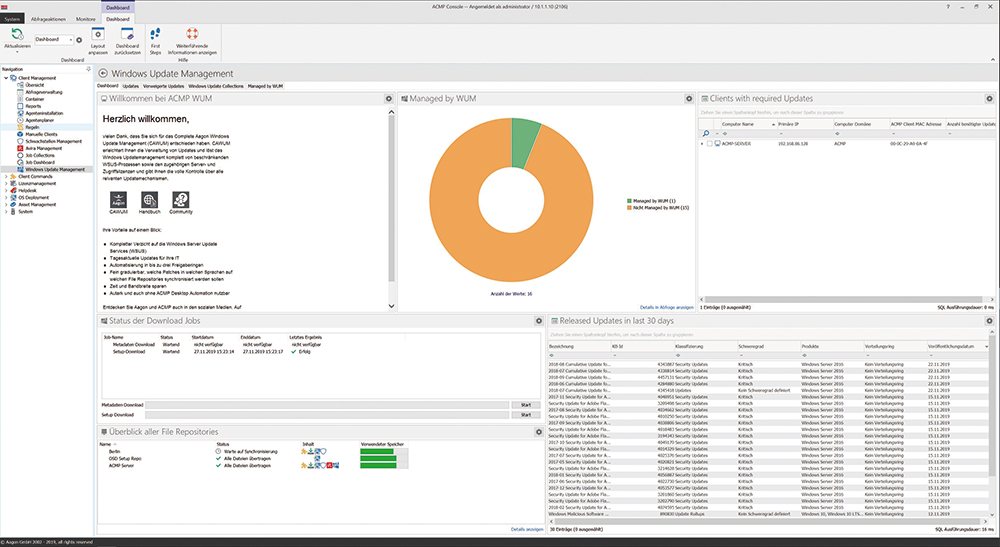
acmp Windows Update Management is our software solution for automated Microsoft updates that is tailored to the customer's individual needs. Nevertheless, it optimizes holistically: in the areas of security, efficiency and functionality.
- Client-specific updates: acmp Windows Update Management only loads exactly the patches that the respective client requires
- Reduced bandwidth: IT systems are no longer occupied by unnecessary updates
- Automated implementation increases security: Windows Update Management makes update processes predictable and transparent
- Saved costs: automation means significantly fewer personnel resources are required
The most important features at a glance

More capacity
Automated release according to distribution rings reduces the workload of the IT department.

More possibilities
Completely dispensing with WSUS saves costs as well as human and technical resources.

Driver distribution
Granular distribution of selected third-party catalogs with drivers. (Dell, Lenovo, HP)

Fast updates
WSUS performs updates once a month - acmp Windows Update Management, however, performs updates daily.
Check updates for functionality
With acmp Windows Update Management, individual release rings can be defined and Windows updates can be distributed to test systems in different subnetworks: This ensures that everything works according to your requirements before you install the updates on the other clients.
Make patches available individually
Clients do not receive the entire update file, which is several gigabytes in size, but the individual patches required. This saves valuable bandwidth and reduces the installation time enormously. Additional feature: You control which patches should be available in which file repositories and in which languages.
Generate daily updates
Conventional solutions are dependent on regularly provided update files from Microsoft. acmp Windows Update Management, on the other hand, is always as up-to-date as the original WSUS server. This allows administrators to react to threats and exploits on a daily basis - either fully automatically or under your control.
Automate tidying up
The practical clean-up function not only generates a clear update status, but also automatically frees up unnecessarily used storage space. This simple feature frees up important capacity in IT, which it can then invest in its actual core tasks.
Group computers
acmp Windows Update Management allows the flexible grouping of PCs based on the exact characteristics selected by an administrator. In this way, computers are dynamically sorted into containers, eliminating the need for manual assignment. This option significantly speeds up internal IT processes.
Generate reports
acmp's comprehensive reporting function generates readable reports. These not only serve as a basis for controlling, but are also necessary for audits and certifications. This feature also underlines the comprehensive functionality of acmp Windows Update Management and ensures time and cost savings.
Third-party catalogs with drivers
Distribute third-party catalogs with drivers in a targeted manner without cloud or WSUS connection - ideal for companies that rely on local control and maximum security. Dell, Lenovo and HP are supported, including granular selection according to driver types and classifications. The test and release mechanisms from the Windows Update Management module are also used here. Full integration into the acmp ecosystem enables a consistent user experience - for rapid adaptation and sustainable cost and security benefits.
Product insight
References
What our customers say



acmp Editions
Our product portfolio provides a structured overview of our versatile UEM solution acmp, consisting of different editions and supplementary add-ons. This allows us to flexibly cover your individual requirements and provide scalable solutions for various application scenarios.
Starter
Transparenz über Ihre
IT-Landschaft
Beinhaltet folgende Funktionen:
- Inventarisierung und Reporting
- Konnektivität und Sicherheit nativ integriert
- Betriebskontinuität – durch steuerbare Systemverfügbarkeit
- Granulare Test- & Freigabeprozesse
- Zentrales Microsoft & Windows Update Management
- Drittanbieter Kataloge für Treiber
Advanced
Bringen Sie
Dynamik in Ihre IT
Starter Edition, plus:
- Zentrale Softwarepaketierung und Verteilung
- Automatisierungsplatform für den IT-Alltag
- Unix-Skriptverwaltung zur breiten Systemabdeckung
Professional
Maximale Stabilität
für Ihre Infrastruktur
Advanced Edition, plus:
- Automatisches 3rd Party Patchmanagement
- Zuverlässig geprüfte Installationsressourcen
- IT-Ressourcen optimierende Bereitstellung
Expert
Vollständiges Unified
Endpoint Lifecycle Management
Professional Edition, plus:
- Zeiteffizientes OS-Deployment
- Granular und reproduzierbare Betriebssystemeinrichtung
- Betriebssystem unabhängiges Lifecyclemanagement
Asset Management Add-on
- Vollständige Übersicht über Hardware-Assets
- Unterstützung bei Budgetplanung
- Lizenzierung nur für verwaltete Endpunkte
- Verknüpfung technischer Inventardaten mit kaufmännischen Informationen
- Einheitliche Datenbasis für Reporting und Audits
- Nachvollziehbarkeit von Gerätezuordnungen
- App inkl. QR Code Scanner für mobilen Zugriff
-
Überwachung und Durchsetzung von BitLocker-Verschlüsselung
-
Verwaltung und Standardisierung der Microsoft Defender Antivirus-Konfiguration
- Identifikation und Behebung von Schwachstellen
- Reduzierung von Angriffsflächen durch automatisierte Sicherheitsrichtlinien
- Erhöhte Compliance bei regulatorischen Anforderungen
- Integration in Automatisierungsprozesse für effizientere Sicherheitsmaßnahmen
-
Transparenz über Lizenznutzung und-verteilung
-
Reduzierung von Compliance-Risiken durch genaue Lizenzkontrolle
-
Optimierung von Lizenzkosten durch gezielte Analysen
-
Präzise Lizenzmodelle durch Verknüpfung von Inventardaten mit DNA
-
Automatisierte Bereinigung von Über-oder Unterlizenzierungen
-
Unterstützung bei strategischer Lizenzplanung und Audit-Vorbereitung
-
Zentrale Anlaufstelle für Anwenderanfragen und Störungen
-
Schnellere Bearbeitung von Incidents und Requests
-
Transparenz über Tickets, Bearbeitungsstände und Verantwortlichkeiten
-
Benutzer-Self-Service für Standardanfragen
-
Automatisierte Lösungen durch Integration mit Desktop Automation
-
Dokumentation und Nachvollziehbarkeit aller IT-Vorgänge
-
Zentrale Sicht auf On-Prem-und Cloud-Clients
-
Einheitliche Betriebsprozesse über alle Geräte hinweg
-
Vermeidung von Tool-Silos durch Integration in acmp
-
Ergänzung von Intune um detaillierte Inventar-und Automatisierungsfunktionen
-
Einheitliches Reporting über alle Endgeräte
-
Effiziente Verwaltung hybrider von UEM-Mehrwerten
Would you like to find out how we can improve your everyday IT life with our solution? Then register for the appropriate events and get to know us better.
FAQ
Is a WSUS server still necessary?
No, acmp Windows Update Management is a fully-fledged replacement for the WSUS server.
Is it possible to deactivate Windows upgrades and then start them when it suits you? Yes, with acmp Windows Update Management, updates and upgrades can be completely separated.
Yes, acmp has an open system for creating your own fields in the database.
Are update files that are no longer required deleted from the server?
Yes, there is a cleanup job in the settings that can be defined in terms of time.
Can EULAs be accepted automatically by acmp?
There is a function to automatically activate EULAs for updates via acmp.
Please note that the automatic acceptance of EULAs may violate applicable law in your country.
Are Office 365 & Office 2019 updates also supported?
Yes, these updates are supported.
Can Microsoft 365 apps also be updated?
Yes, acmp Windows Update Management also takes care of this if the uninstallation of the update is enabled by Microsoft.
Language packs can also be supplied and patched. In acmp, the Office 365 update behaves like any other Windows update and any number of test and release rings can be set, for example.
Can updates be uninstalled?
Yes, if Microsoft allows you to uninstall the update.
Can I also distribute drivers with acmp Windows Update Management?
Yes, our Windows Update Management supports third-party driver catalogs, from which you can select and distribute granularly. Currently Dell, Lenovo & HP are supported.
Noch Fragen? Wir helfen Ihnen gerne weiter oder vereinbaren Sie direkt einen Termin unter:
+49 2921 789 200 oder sales@aagon.com