
Core
- Fully automated, comprehensive acquisition of hardware and software
- Wide range of reporting options
- Integrated functionality for further administrative functions
Core includes the inventory of hardware data and operating systems, the automation and logging of routine tasks, information on parameters and settings for all clients, end-of-life documentation, the acmp console, the report engine, the kiosk, distributed file repositories, contract and document management, user management, and the acmp server components.
Core lays the foundation for using the other modules, which mesh together like gears to provide comprehensive solutions for the unique challenges faced by IT departments.
Security should not be neglected here, which is why the acmp Console can be configured with 2-factor authentication for logging in. This can also be enforced via the user administration if desired. This is a TOTP procedure.
The most important features at a glance

Fully automated, comprehensive acquisition of hardware and software

Automate setup routines

Monitoring of existing antivirus solutions

Clients are no longer taken into account for license management and software distribution
Inventory
Reliable and precise inventory of all Windows/Linux/macOS clients and servers using extended scan functionalities as well as evaluation, filtering, sorting and grouping of data directly in the data grid.
Gateway
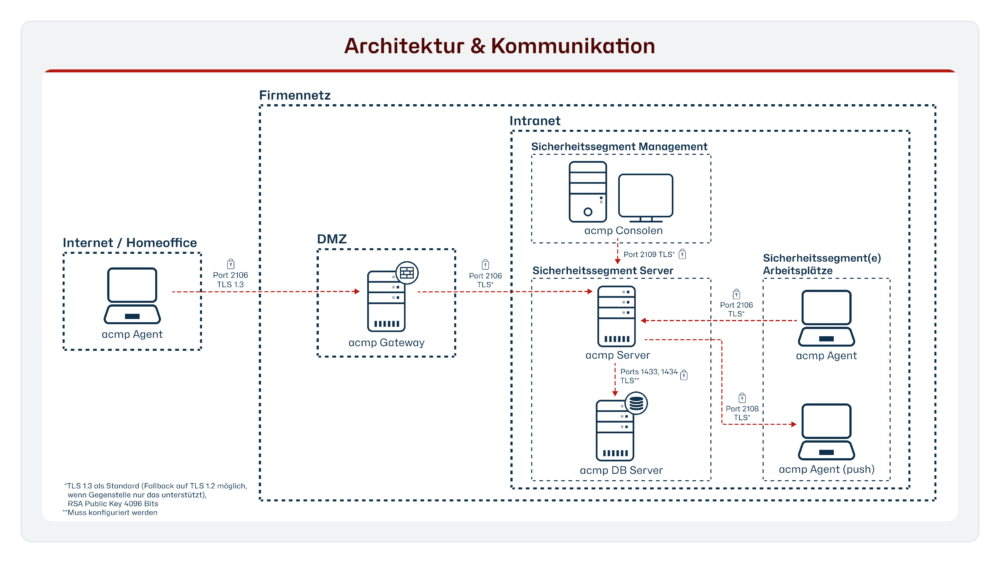
The gateway can be used to establish a secure connection between the acmp server and the agent via the Internet. The gateway checks whether an agent logs in with a valid certificate and then forwards the data stream to the acmp server. It also enables the secure connection of home office clients to the acmp server.
Multifactor authentication
The login to the acmp Console can be secured using multi-factor authentication. This can also be enforced via the user administration if desired. This is a TOTP procedure.
Console
Central management of acmp and execution of the desired actions.
Report engine
Creation of structured and comprehensible tables and diagrams based on the data and figures from the inventory.
Kiosk
Enables simplified software distribution for the clients. Users can independently install the software provided by the administrator and run selected applications.
Distributed file repositories
Copying of created file repositories including all settings for user data, synchronization periods and bandwidth restrictions.
Contract and document management
Contracts and electronic documents can be recorded and linked and used in other modules.
User administration
Create, edit and remove users/user groups.
Use without software agents
Administrators do not always want to permanently install a software agent. However, in order to obtain all important detailed information about a computer, we have developed the OneScanClient. This is started once, collects and transmits the information to the database and disappears from the hard disk again, except for an entry for repeated identification of the respective client.
Sorting, grouping and filtering
The IT administrator will rarely be interested in all the detailed data. With just a few mouse clicks, the IT professional can ensure that acmp only displays the precise results of the inventoried data. Using drag-and-drop, the administrator structures, groups or nests the desired results in real time.
Recognize and control shadow IT
The acmp server monitors the network and automatically detects new devices. This makes it easy to detect and control shadow IT. In combination with acmp Asset Management, you not only have an overview of all existing computers, but also monitors, printers and so on. This minimizes sources of error due to unknown hardware.
Secure connection
acmp uses the standards "Windows Management Instrumentation" (WMI) and the "Simple Network Management Protocol" (SNMP) to obtain information. The connection between the agent and the database on the acmp server is always established via a secure connection. Not every client has access to the database, but only the acmp server. Control is always carried out via a modern and central console by the administrator.
Wide range of applications
acmp gives you full control over menus, buttons and all other control elements. The range of functions includes locating and selecting list entries as well as starting, operating and monitoring programs and installation routines.
acmp is always used when it is not possible to run a setup "silently" or when certain settings are not provided for in the setup process.
Recognize risks and threats
Microsoft has had the Security Center since Windows XP Service Pack 2. In Windows 8, you will find it again under the name Maintenance Center. With the Security/Maintenance Center, the user is informed about the essential protective measures of his computer. Unfortunately, this information is only available locally.
Decommissioning, storage and scrapping - documented in an audit-proof manner
With just two clicks, you can set a client in acmp to "Retired". With this action, the selected clients disappear from acmp and the license management and software distribution.
Using separate "Retired Clients" queries, you still have the option of accessing the most important key data for these clients and editing detailed information. For example, if an appliance has been put into storage, you still need to enter the storage location. Editing only ends when the device is finally scrapped.
Product insight
References
What our customers say



acmp Editions
Our product portfolio provides a structured overview of our versatile UEM solution acmp, consisting of different editions and supplementary add-ons. This allows us to flexibly cover your individual requirements and provide scalable solutions for various application scenarios.
Starter
Transparency Regarding Your
IT Landscape
Includes the following features:
- Inventory and Reporting
- Connectivity and security natively integrated
- Business Continuity – Through Controllable System Availability
- Granular Testing and Release Processes
- Centralized Microsoft & Windows Update Management
- Third-Party Catalogs for Drivers
Advanced
: Bring Dynamism to Your IT
Starter Edition, plus:
- Centralized Software Packaging and Distribution
- Automation Platform for Everyday IT Operations
- Unix script management for broad system coverage
Professional
Maximum Stability
for Your Infrastructure
Advanced Edition, plus:
- Automated Third-Party Patch Management
- Reliably Verified Installation Resources
- IT Resource Provisioning for Optimization
Expert
Comprehensive Unified
Endpoint Lifecycle Management
Professional Edition, plus:
- Time-Efficient OS Deployment
- Granular and Reproducible Operating System Configuration
- Operating System-Independent Lifecycle Management
Asset Management Add-on
- Complete overview of hardware assets
- Support with budget planning
- Licensing only for managed endpoints
- Linking technical inventory data with commercial information
- Standardized database for reporting and audits
- Traceability of device assignments
- App incl. QR code scanner for mobile access
-
Monitoring and enforcement of BitLocker encryption
-
Management and standardization of Microsoft Defender AntivirusConfiguration
- Identification and elimination of weak points
- Reduction of attack surfaces through automated security policies
- Increased compliance with regulatory requirements
- Integration into automation processes for more efficient security measures
-
Transparency about license usage and-distribution
-
Reduction of complianceRisks due to precise license control
-
Optimization of license costs through targeted analyses
-
Precise license models by linking inventory data with DNA
-
Automated cleansing of excessor sublicensing
-
Support with strategic license planning and audit preparation
-
Central point of contact for user queries and faults
-
Faster processing of incidents and requests
-
Transparency about tickets, processing statuses and responsibilities
-
User self-service for standard requests
-
Automated solutions through integration with desktop automation
-
Documentation and traceability of all IT-processes
-
Centralized view of onPrem and cloud clients
-
Standardized operating processes across all devices
-
Avoidance of tool-Silos through integration in acmp
-
Addition of detailed inventory and automation functions to Intune
-
Standardized reporting across all end devices
-
Efficient management of hybrid UEM added value
Would you like to find out how we can improve your everyday IT life with our solution? Then register for the appropriate events and get to know us better.
FAQ
Can I secure the login to the console with 2-factor authentication (MFA)?
Yes, the acmp Console supports multi-factor authentication, which can also be made mandatory for users.
Can the inventory database be expanded?
Yes, acmp has an open system for creating your own fields in the database.
What information can be inventoried?
All information (hardware, software, patch and security status, ...) from a computer can be comprehensively inventoried.
Is the inventory process GDPR-compliant?
Yes, no personal information is collected and stored in the database.
Do you have any questions? We will be happy to help you or make an appointment directly at:
+49 2921 789 200 or sales@aagon.com