
Defender Management destroys malware on all clients
- Central management of Windows Defender
-
Fast commissioning
-
Immediately retrievable reports
-
Secure solution that saves costs
Defender Management is our software solution for the central administration of Microsoft Defender on all clients in the company network and for improving your security management. The clear user interface of the acmp Console generates transparency, actionability and security.
This implies:
- Wide range of functions: comparable antivirus solutions offer much less
- Fast commissioning and configuration thanks to pre-installation in the operating system
- Retrievable reports: Queries for evaluating all data can be viewed at any time
The most important features at a glance

More time
Central management of all clients in the company network creates capacity for IT

Less ransomware
As system scans, updates and patches can be triggered or distributed at any time

More transparency
The clear structure of the acmp Console is intuitive to use and creates synergies

High cost savings
Defender Management optimizes Microsoft Defender, which has been free since version 10
Queries, dashboards and reports
Defender Management displays the Defender status, scan histories, the latest threats and information on the next upcoming scan and offers the option of querying the used / unused configuration profiles and much more. The functions support you in your antivirus management.
Tamper protection
Tamper protection prevents various settings from being set so that malicious apps cannot change important Microsoft Defender antivirus settings. Tamper protection cannot be deactivated automatically.
Authorization and user rights management
Administrators can configure the user rights for configuration profiles, containers and query actions. The authorizations for groups and their users can also be adjusted.
Event overview
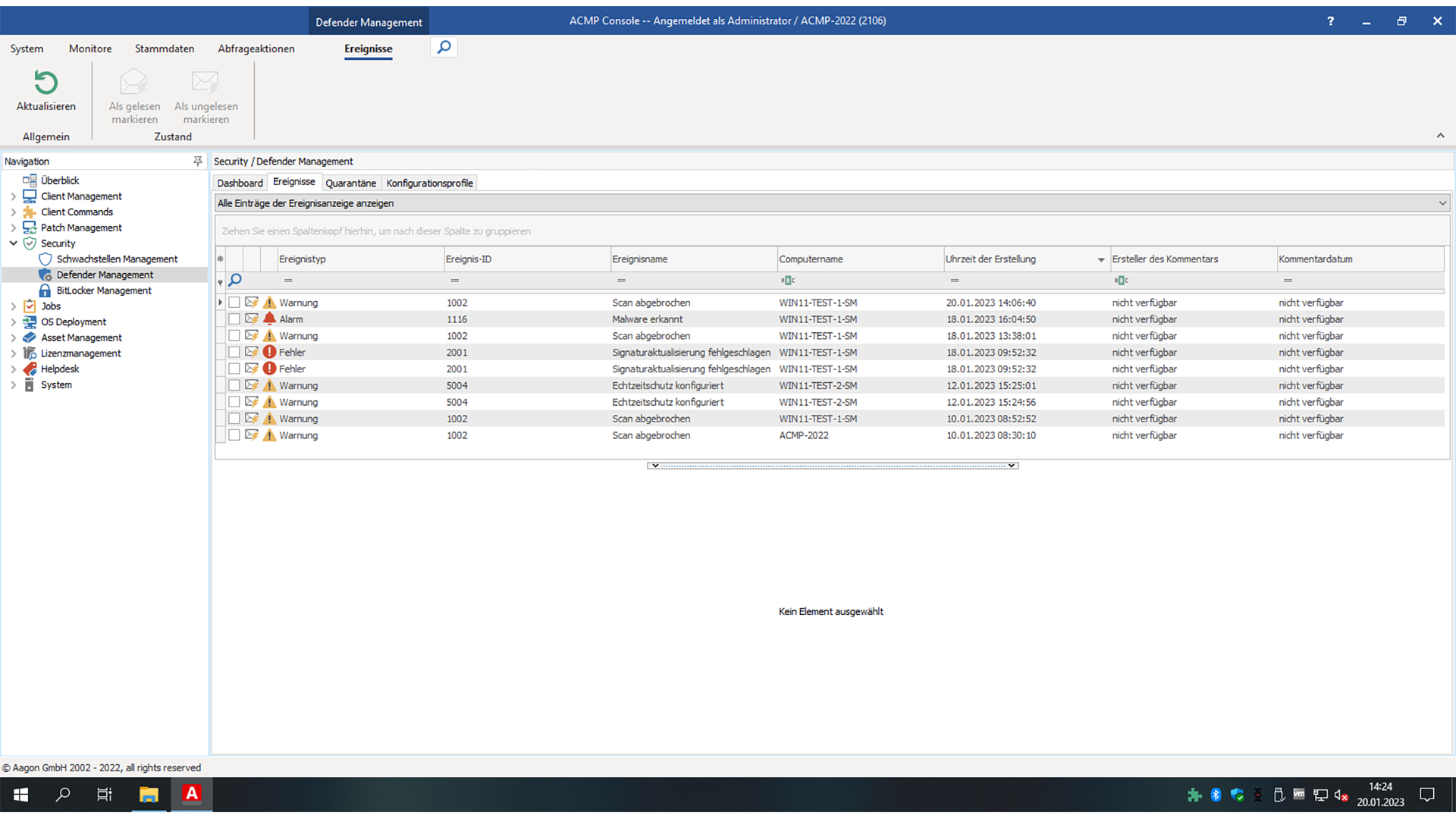
Regular scans are carried out for detections, threats and updates. Notifications about detections are sent in real time. There is also an overview of all threats found, failed updates and other events. The display of events can be configured. There is also the option of filtering, sorting and deleting outdated events. You can navigate directly from an event to the affected client.
Central quarantine
You can easily view and restore quarantine files and perform actions on them centrally from the acmp console. Quarantine files can be automatically deleted after a defined period of time.
Start antivirus scan on the client
You can start the antivirus scan on a client and display the status of the scan in the logs. It is also possible to assign scheduled scans to a client via a configuration profile or to remove them.
Management without cloud connection
Microsoft does not offer companies with critical infrastructures that are not directly connected to the Internet for security reasons the option of managing Microsoft Defender without a cloud connection. The use of acmp Defender Management solves this problem, as acmp can be used simply and easily directly "on premises". This means that even in such environments, there is no reason why Microsoft Defender cannot be used on the end devices.
Product insight
References
What our customers say



acmp Editions
Our product portfolio provides a structured overview of our versatile UEM solution acmp, consisting of different editions and supplementary add-ons. This allows us to flexibly cover your individual requirements and provide scalable solutions for various application scenarios.
Starter
Transparenz über Ihre
IT-Landschaft
Beinhaltet folgende Funktionen:
- Inventarisierung und Reporting
- Konnektivität und Sicherheit nativ integriert
- Betriebskontinuität – durch steuerbare Systemverfügbarkeit
- Granulare Test- & Freigabeprozesse
- Zentrales Microsoft & Windows Update Management
- Drittanbieter Kataloge für Treiber
Advanced
Bringen Sie
Dynamik in Ihre IT
Starter Edition, plus:
- Zentrale Softwarepaketierung und Verteilung
- Automatisierungsplatform für den IT-Alltag
- Unix-Skriptverwaltung zur breiten Systemabdeckung
Professional
Maximale Stabilität
für Ihre Infrastruktur
Advanced Edition, plus:
- Automatisches 3rd Party Patchmanagement
- Zuverlässig geprüfte Installationsressourcen
- IT-Ressourcen optimierende Bereitstellung
Expert
Vollständiges Unified
Endpoint Lifecycle Management
Professional Edition, plus:
- Zeiteffizientes OS-Deployment
- Granular und reproduzierbare Betriebssystemeinrichtung
- Betriebssystem unabhängiges Lifecyclemanagement
Asset Management Add-on
- Vollständige Übersicht über Hardware-Assets
- Unterstützung bei Budgetplanung
- Lizenzierung nur für verwaltete Endpunkte
- Verknüpfung technischer Inventardaten mit kaufmännischen Informationen
- Einheitliche Datenbasis für Reporting und Audits
- Nachvollziehbarkeit von Gerätezuordnungen
- App inkl. QR Code Scanner für mobilen Zugriff
-
Überwachung und Durchsetzung von BitLocker-Verschlüsselung
-
Verwaltung und Standardisierung der Microsoft Defender Antivirus-Konfiguration
- Identifikation und Behebung von Schwachstellen
- Reduzierung von Angriffsflächen durch automatisierte Sicherheitsrichtlinien
- Erhöhte Compliance bei regulatorischen Anforderungen
- Integration in Automatisierungsprozesse für effizientere Sicherheitsmaßnahmen
-
Transparenz über Lizenznutzung und-verteilung
-
Reduzierung von Compliance-Risiken durch genaue Lizenzkontrolle
-
Optimierung von Lizenzkosten durch gezielte Analysen
-
Präzise Lizenzmodelle durch Verknüpfung von Inventardaten mit DNA
-
Automatisierte Bereinigung von Über-oder Unterlizenzierungen
-
Unterstützung bei strategischer Lizenzplanung und Audit-Vorbereitung
-
Zentrale Anlaufstelle für Anwenderanfragen und Störungen
-
Schnellere Bearbeitung von Incidents und Requests
-
Transparenz über Tickets, Bearbeitungsstände und Verantwortlichkeiten
-
Benutzer-Self-Service für Standardanfragen
-
Automatisierte Lösungen durch Integration mit Desktop Automation
-
Dokumentation und Nachvollziehbarkeit aller IT-Vorgänge
-
Zentrale Sicht auf On-Prem-und Cloud-Clients
-
Einheitliche Betriebsprozesse über alle Geräte hinweg
-
Vermeidung von Tool-Silos durch Integration in acmp
-
Ergänzung von Intune um detaillierte Inventar-und Automatisierungsfunktionen
-
Einheitliches Reporting über alle Endgeräte
-
Effiziente Verwaltung hybrider von UEM-Mehrwerten
Would you like to find out how we can improve your everyday IT life with our solution? Then register for the appropriate events and get to know us better.
FAQ
What Microsoft licensing is required for Microsoft Defender?
You can already use most of the Defender functions from Windows 10 Pro. Depending on the size of your contract with Microsoft, additional enterprise functions are added with E3 or E5 or Education A5. Microsoft has summarized the exact range of Microsoft Defender functions, depending on the licensing, here .
Where is the data processed and stored by MS Defender?
The data is stored centrally and only in the acmp database.
What happens to quarantined files?
These can be restored or automatically deleted using the cleanup service. Exceptions can also be defined for quarantined files.
Are there automatic notifications for finds?
This is implemented with the help of reports. As soon as a notification of a find is received, a report can be sent automatically.
Can fixed scan times be defined?
Times can be defined for quick, full and custom scans.
Is it possible to assign Defender profiles dynamically?
Yes, profiles can be assigned dynamically via the containers.
Noch Fragen? Wir helfen Ihnen gerne weiter oder vereinbaren Sie direkt einen Termin unter:
+49 2921 789 200 oder sales@aagon.com