


Soest, May 19, 2021 - In just a few weeks, client management specialist aagon will be making the new management module for Microsoft Defender in acmp available to its customers. The new tool offers administrators the ability to conveniently manage Microsoft Defender Antivirus on all clients and servers via a single interface.
The quality of Microsoft Defender Antivirus real-time virus protection is well known among IT experts. They use the software to strengthen IT security in the company network. The MS tool reliably detects viruses, malware and spyware in emails, apps, the cloud and on the web. However, using the tool can be time-consuming and cumbersome if no central administration is set up. This is where acmp Defender Management comes in, allowing IT administrators to manage all associated clients and servers via a single interface - the acmp Console - to control.
For acmp users, the new solution offers numerous advantages such as
- significant cost savings, as an additional antivirus solution is no longer required,
- Simple commissioning and improved performance, as MS Defender Antivirus is already integrated in Windows,
- more and clearer management functions than Microsoft's own administration,
- Dashboards and reports for possible security audits and
- Simple and centralized configuration.
"With MS Defender Antivirus, we have found the ideal addition to our acmp suite. Among other things, I am impressed by additional features such as quarantine management, which allows quarantine files to be edited easily via the console," explains Sebastian Weber, Head of Product Management at aagon. "And the feedback from our customers on this innovation is clearly positive."
Further additions to the range of functions are:
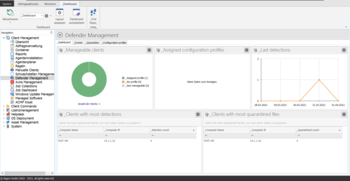
- acmp Defender Management shows the Defender status, scan histories, latest threats and information about the next upcoming scan. It also offers the option of querying the used and unused configuration profiles.
- The Tamper protection prevents the setting of certain settings that could be used by malicious apps to change important Microsoft Defender antivirus settings. This tamper protection can be do not deactivate.
- Administrators can use the User rights for configuration profiles, containers and query actions. In addition, the Customize permissionsfor groups and their users.
- The tool regularly scans for detections, threats and updates. Notifications about detections are sent in real time. There is also an overview of all threats found, failed updates and other events. The display of events can be configured and it is possible to filter, sort and delete outdated events.